Table
Effortlessly manage tabular data with gluestack-ui Table component. A fully customizable React Native table component for smooth data display in your UI. Perfect for any project! This is an illustration of Table component.Installation
Run the following command:
npx gluestack-ui@alpha add tableAPI Reference
To use this component in your project, include the following import statement in your file.import {
Table,
TableHeader,
TableFooter,
TableBody,
TableHead,
TableData,
TableRow,
TableCaption,
} from '@/components/ui/table';
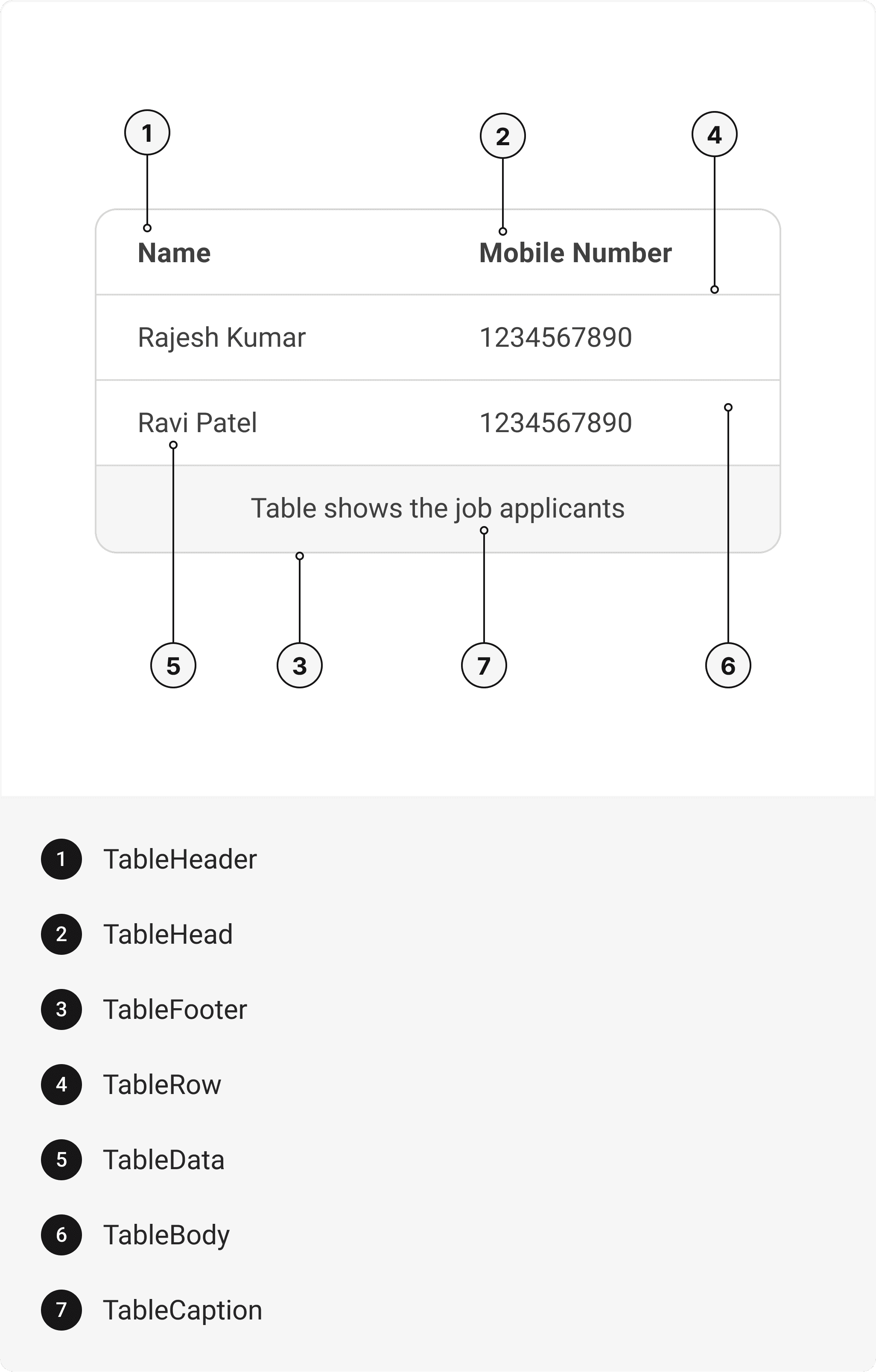
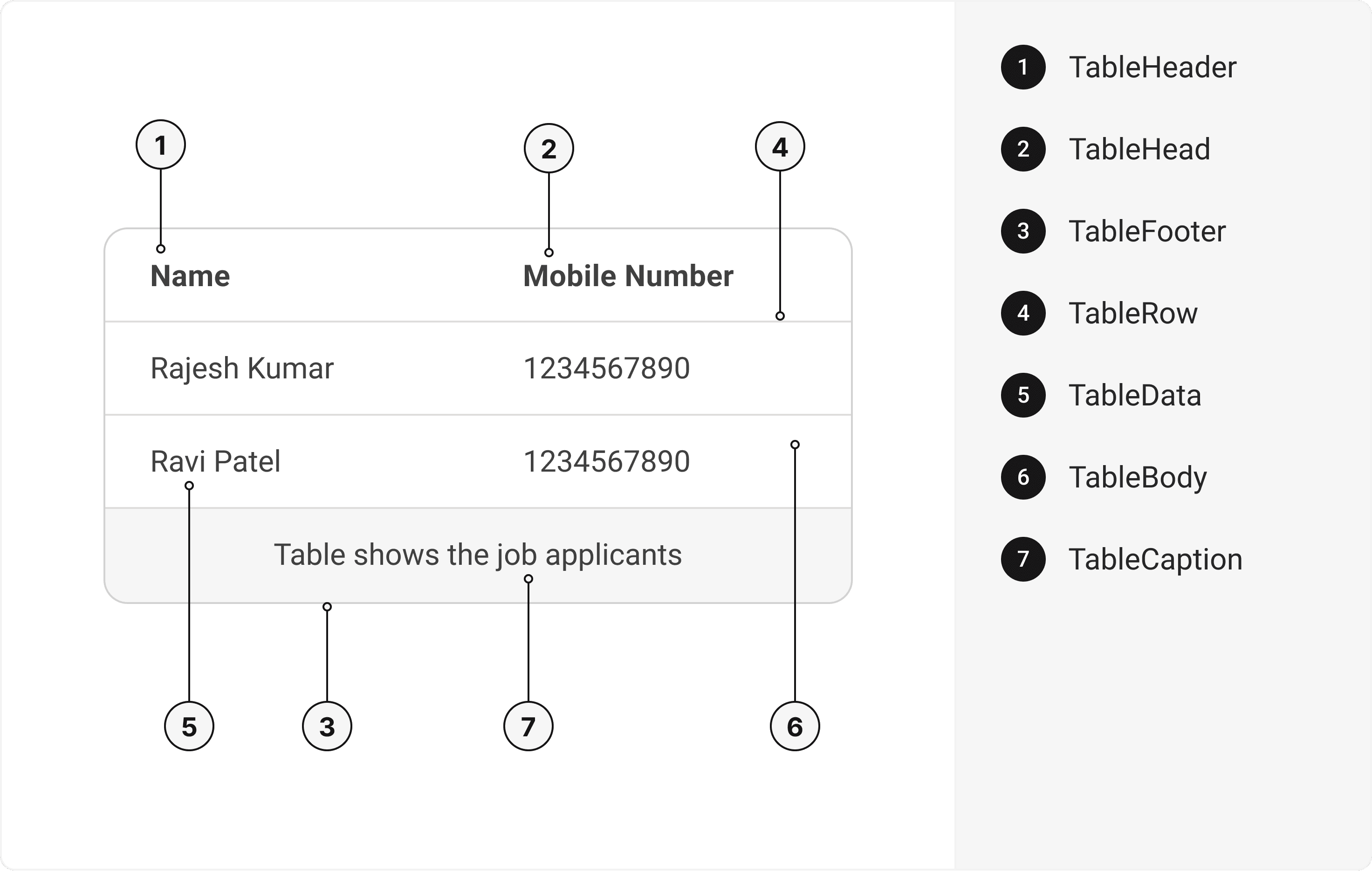
export default () => (
  <Table>
    <TableHeader>
      <TableRow>
        <TableHead />
      </TableRow>
    </TableHeader>
    <TableBody>
      <TableRow>
        <TableData />
      </TableRow>
    </TableBody>
    <TableFooter>
      <TableRow>
        <TableData />
      </TableRow>
    </TableFooter>
    <TableCaption />
  </Table>
);
Component Props
This section provides a comprehensive reference list for the component props, detailing descriptions, properties, types, and default behavior for easy project integration.Table
It inherits all the properties of of @expo/html-elements'sTable
on native and html table tag on web.
TableHeader
It inherits all the properties of of @expo/html-elements'sTHead
on native and html thead tag on web.
TableRow
It inherits all the properties of of @expo/html-elements'sTR
on native and html tr tag on web.
TableData
It inherits all the properties of React Native'sText
component on native and html td tag on web.
| Prop | Type | Default |
|---|---|---|
| Prop | Type | Default |
useRNView | boolean | If true renders a react-native view component instead of a text component. |
TableHead
It inherits all the properties of React Native'sText
component on native and html th tag on web.
| Prop | Type | Default |
|---|---|---|
useRNView | boolean | If true renders a react-native view component instead of a text component. |
| boolean | If true renders a react-native view component instead of a text component. |
TableBody
It inherits all the properties of of @expo/html-elements'sTBody
on native and html tbody tag on web.
TableFooter
It inherits all the properties of of @expo/html-elements'sTFoot
on native and html tfoot tag on web.
TableCaption
It inherits all the properties of of @expo/html-elements'sCaption
on native and html caption tag on web.
Examples
The Examples section provides visual representations of the different variants of the component, allowing you to quickly and easily determine which one best fits your needs. Simply copy the code and integrate it into your project.Table with caption
This is an example of a Table component with a caption.Stripped table
This example demonstrates a table with a striped background.Table with other components
This example illustrates a table component with a badge component.Table with top and side header
This example illustrates a table component with a top and a side header.Edit this page on GitHub